Retail commerce systems

Where did the sale go? Your customer has the receipt, but the return still needs an answer.

A return should not require searching one system for the order, another for the payment and a third to decide where the product belongs. We follow the sale from availability through checkout, fulfillment, return and close.

1-800-818-0420·info@dataonems.com

Independent home-goods retailer serving a customer while store work continues nearby.
DATAONE / RETAILAI-generated illustration · not a customer or confirmed configuration.

THE OPERATING CONNECTION

One sale should still make sense after pickup, shipment or return.

Follow the product, customer, tender and location record together so the team is not rebuilding the transaction after the customer leaves.

ONE ORDER RECORDITEM / ORDER / CUSTOMERThe identifiers that should survive every handoff.

Select

Catalog, availability and customer intent

Sell

Price, discount, customer and tender

Fulfill

Carryout, pickup or shipment ownership

Return

Original order, tender and stock reversal

Reconcile

Location, payout and accounting record

AFTER THE SALE

Availability, pricing, fulfillment and returns need an owner before a system can be judged.

RETAIL WORKFLOWS

A specialty shop, several locations and an online-plus-store operation do not break in the same places.

Start with how the customer buys, where inventory is owned and who has to resolve the exception.

Specialty retail operating scene
AI-generated illustration · not a customer or confirmed configuration.
STORE MODEL

Specialty retail

Protect the product knowledge and customer service that make the store different.

  • Variants and product detail
  • Special orders and customer history
  • Original-order returns
Multi-location retail operating scene
AI-generated illustration · not a customer or confirmed configuration.
LOCATION MODEL

Multi-location retail

Share standards without losing location-level inventory and accountability.

  • Location inventory
  • Role and permission control
  • Transfer and closeout records
Omnichannel retail operating scene
AI-generated illustration · not a customer or confirmed configuration.
CHANNEL MODEL

Omnichannel retail

Keep availability, pickup, shipment and returns tied to the same order.

  • Channel ownership
  • Local fulfillment
  • Cross-channel returns

CONNECTED-SYSTEM BACKBONE

When the website, shelf and register disagree, the customer finds out first.

Availability, pricing, fulfillment and returns need an owner before a system can be judged.

THE SHARED REFERENCEONE SALEOrder · item · customer · location
CatalogItem identity
InventoryCount & location
CustomerHistory & ownership
PaymentTender & refund
AccountingPayout & close
Retail associate handling a return at the counter
AI-generated illustration · not a customer or confirmed configuration.

THE RETAIL STRESS TEST

Try the return your staff dreads—not the checkout every demo can pass.

Find the original order, confirm the tender, restore the correct stock and reconcile the right location without asking the customer to wait through an investigation.

Original saleOrder + tender
Return decisionItem + policy
Record reversalStock + refund
Store closeLocation + payout
USEFUL WHEN

Online pickup, cross-location returns, special orders and customer-history workflows.

VERIFY FIRST

Order lookup, tender rules, inventory ownership, location permissions and outage behavior.

DO NOT ASSUME

A connected storefront automatically reverses inventory and payment records in the same way.

WHERE CONTROL BREAKS

The register says finished. Inventory, customer history or closeout says otherwise.

These are the mismatches that send staff searching after the customer has already left.

ONLINE 12SHELF 8DOES NOT AGREE

Availability drift

The website, shelf and location record disagree about what can be sold.

Verify the availability owner
ORDER?TENDERLOOKUP BREAK

Return uncertainty

The team cannot find the original order, tender or correct stock adjustment.

Verify original order and tender
ORDER ✓PAYOUT —LEDGER ?

Closeout mismatch

The order, payout and location or accounting record tell different stories.

Verify settlement and location close

PLATFORM FIT STUDY

Test retail platforms with the same product lifecycle.

Named platforms are evaluation candidates—not predetermined answers or universal compatibility claims.
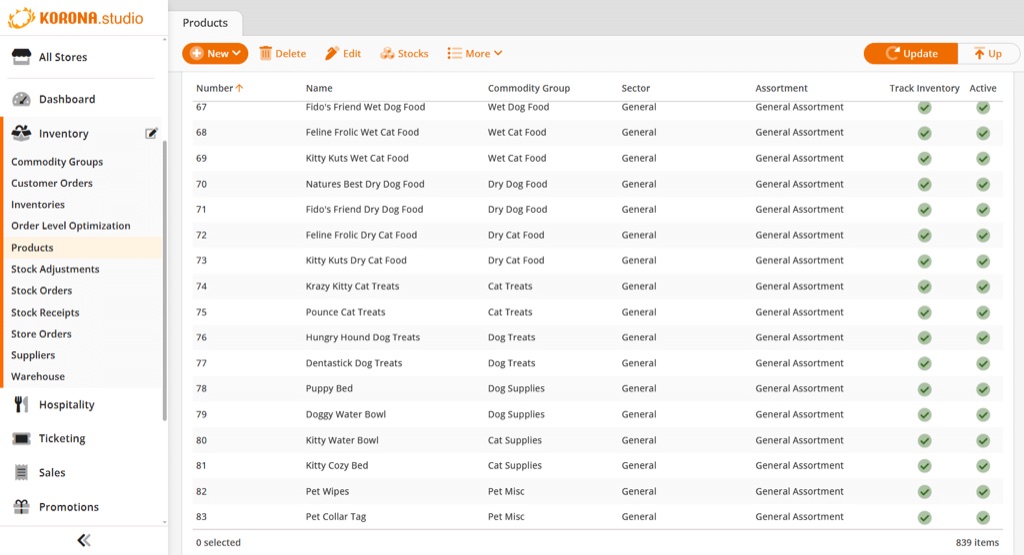
Official KORONA Studio products and inventory screen
KORONA POS product and inventory screen

Inventory-led retail

KORONA POS

Evaluate receiving, product control, location inventory and checkout against one real product lifecycle.

Use one real SKUFollow it through return and close

Exact product, configuration, availability and integrations still require verification.
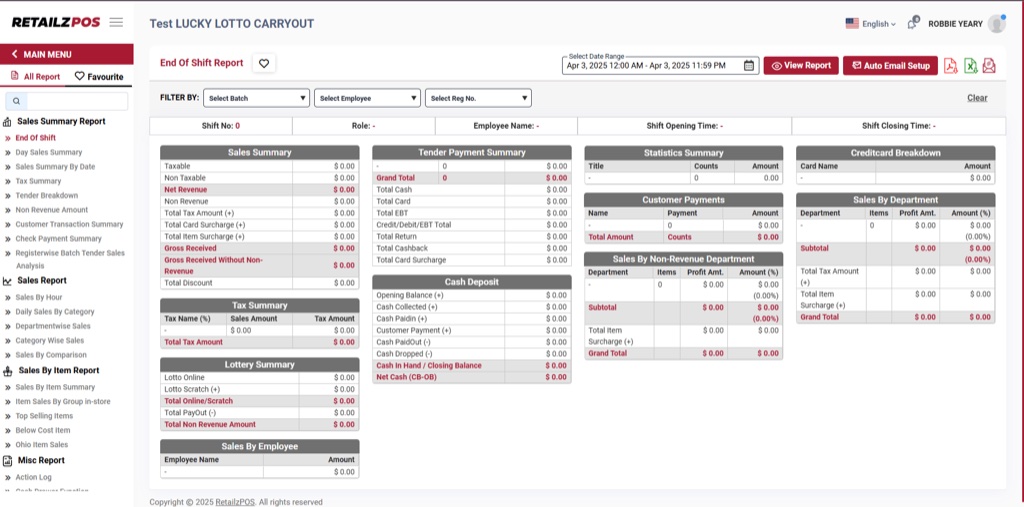
Official RetailzPOS end-of-shift reporting screen
RetailzPOS end-of-shift reporting screen

Flexible retail formats

RetailzPOS

Evaluate counter formats, inventory and distributor records, and portable workflows for the actual store type.

Use one real SKUFollow it through return and close

Exact product, configuration, availability and integrations still require verification.

Product imagery is used with permission. Product availability, editions and configuration vary.

WHAT A REVIEW COVERS

Can one product survive purchase, pickup, return and reconciliation without becoming a search?

We document which records agree, which claims require testing and whether any change is worth the training and disruption.

MERCHANT INPUT

Bring

One product, one completed order and one difficult return.

OPERATING MAP

Map

Identify which system owns catalog, stock, customer, payment and fulfillment.

LIVE VERIFICATION

Verify

Test devices, platform editions, connections and exception behavior.

NEXT STEP

Compare

Document what can stay, what must connect and the least disruptive change.

THE OUTPUT

An recommended next check showing what may stay, what needs verification and which change—if any—deserves a closer comparison.

No outcome or compatibility is promised before verification.

QUESTIONS TO RESOLVE

Six retail questions to resolve before rollout.

Direct answers to the questions that should be settled before equipment, software or payment decisions are finalized.

Can we keep our current online store or inventory system?
Possibly. First establish which system reliably owns the catalog, available inventory, customer record and order. Any new payment or POS path should be tested without breaking those responsibilities.
How should we compare retail operating platforms?
Use the same product lifecycle for every candidate: receive, stock, sell, fulfill, return and reconcile. Product availability, integrations and the exact configuration still require verification.
Can we reuse our current scanners, printers and payment devices?
Device reuse depends on model, ownership, certification, software version and provider requirements. Inventory the exact equipment before including it in a setup under review.
Can stores and ecommerce share inventory, customers and returns?
They may be able to when the selected platforms and editions support the required connections. Prove it with a real sale, pickup, cancellation, return and location transfer rather than a feature list.
What should we test before changing retail systems?
Follow one representative SKU through receiving, sale, fulfillment, return, stock correction and location reporting. Include discounts, gift balances, customer identification, refunds and outage behavior where relevant.
How should we compare total cost and rollout?
Include processing, software, hardware, implementation, training, support, fulfillment errors, returns and staff recovery time. A safer rollout may begin with one location or product group before wider migration.

A clear next step

The best stress test is the return, pickup or inventory exception your team keeps rebuilding.